ZTracer
ZTracer is the abstraction provided by this library which allows you to seamlessly create traces & spans. For example:
import zio.*
import io.kaizensolutions.trace4cats.zio.extras.ZTracer

val nestedTraceExample: URIO[ZTracer, Unit] =
  ZTracer.span("parent") {
    ZTracer
      .span("child1")(ZTracer.span("grandchild")(ZIO.unit))
      .zipParLeft(ZTracer.span("child2")(ZIO.unit))
  }
This generates the following structure:
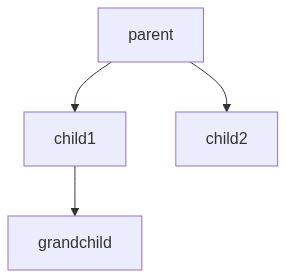
Notice that using the ZTracer abstraction cannot fail; meaning if you mis-configure the tracing configuration, your application will continue to function but traces will not be reported.
ZStream integration
ZTracer can also be used to trace ZStreams in tandem with the Spanned datatype where each element of the ZStream
has an associated span (i.e. Kafka messages). For example:
import zio.*
import zio.stream.*
import io.kaizensolutions.trace4cats.zio.extras.*
import trace4cats.*

// create a stream where each element is associated with a trace header
val stream: ZStream[ZTracer, Nothing, (Int, TraceHeaders)] =
  ZStream.range(1, 100)
  .mapZIO(i =>
    ZTracer.withSpan(s"name-$i")(span =>
      ZIO.succeed((i, span.extractHeaders(ToHeaders.standard)))
    )
  )

// create spans for elements in the stream
val tracedOperationStream: ZStream[ZTracer, Throwable, Spanned[Int]] =
  stream.traceEachElement(element => /* we name each span based on the element*/ s"in-begin-$element") {
    case (_, headers) => headers // we extract the headers from the element
  }
  .mapThrough(_._1) // we only care about the element, not the headers - traceEachElement will automatically add the headers back
  .mapZIOTraced("Plus 1")(e =>
    ZTracer.span(s"plus 1 for $e")(Console.printLine(s"Adding ${e} + 1 = ${e + 1}") *> ZIO.succeed(e + 1))
  )
  .mapZIOParTraced("Plus 2")(8)(e =>
    ZTracer.span(s"plus 2 for $e")(
      Console.printLine(s"Adding ${e} + 2 = ${e + 2}").delay(500.millis) *>
        ZIO.succeed(e + 2)
    )
  )
  .mapZIOParTraced("Plus 4")(3)(e =>
    ZTracer.span(s"plus 4 for $e")(
      ZTracer.spanSource()(Console.printLine(s"Adding ${e} + 4 = ${e + 4}").delay(1.second)) *>
        ZIO.succeed(e + 2)
    )
  )
Running the stream above, we'd expect to see something along the lines of:
Have a look at the example if you want to learn more.
Log Context Enrichment
ZTracer automatically enriches the ZIO log context with trace information via LogContextExtractor. This means
any ZIO.log* calls within a traced span will include trace/span IDs in the log output without any additional
configuration.
By default, ZTracer.layer uses LogContextExtractor.default which adds OpenTelemetry-compatible trace_id and
span_id annotations to the log context. You can customize this behavior when constructing the tracer layer:
import io.kaizensolutions.trace4cats.zio.extras.{LogContextExtractor, ZTracer, ZEntryPoint}
import cats.Show
import trace4cats.model.{SpanContext, SpanId, TraceId}
import zio.*

// Use the default (OTel-compatible trace_id and span_id)
val defaultLayer: URLayer[ZEntryPoint, ZTracer] = ZTracer.layer

// Customize the log annotations
val customLayer: URLayer[ZEntryPoint, ZTracer] = ZTracer.layerWith(
  logContextExtractor = (spanContext: SpanContext) => Set(
    LogAnnotation("myTraceId", Show[TraceId].show(spanContext.traceId)),
    LogAnnotation("mySpanId", Show[SpanId].show(spanContext.spanId))
  )
)

// Disable log enrichment entirely
val noEnrichmentLayer: URLayer[ZEntryPoint, ZTracer] = ZTracer.layerWith(LogContextExtractor.none)